
Employees who finish a mandatory compliance course usually finish it within days of the assignment, not weeks, so the real benchmark for a multi-location employer is how many assignments get started at all and which sites fall behind. Track start rate, completion inside 7 and 30 days, and overdue assignments by location, and chase non-starters in the first week instead of the week before a deadline.
An overall completion percentage hides the one store, branch, or plant that will fail an audit, which is why speed and site-level detail matter more than a single company-wide number.
How fast do employees actually complete assigned compliance training?
Fast, once they open it. Most mandatory compliance courses are short enough to finish in one sitting, and the learner who clicks the assignment link in the first few days tends to finish in the same sitting or the next one. The long tail comes from people who never start: the employee on leave, the second-shift worker without a computer, the new hire whose account was created before their email was active, or the manager who assumes the reminder was for someone else.
Coggno looked at its own platform data to put numbers on this pattern. The figures below come from HR compliance and OSHA safety courses (harassment prevention, workplace violence, general HR compliance, and OSHA safety topics) assigned across customer accounts using the Coggno LMS, in all industries rather than multi-location employers specifically:
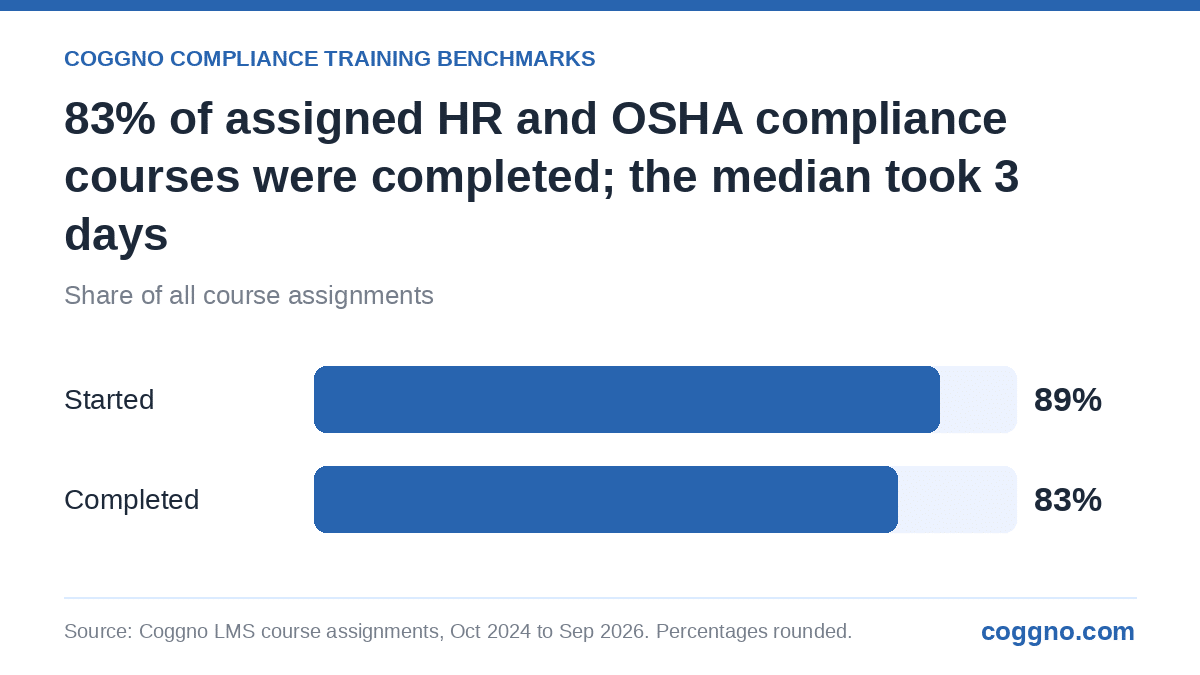
In Coggno platform data, 83% of assigned HR compliance and OSHA safety courses were completed, and the median completed course was finished 3 days after it was assigned.
Source: Coggno Compliance Training Benchmarks, Coggno LMS course assignments, October 2024 to September 2026. See About the data below.
Read the two bars together. Coggno Compliance Training Benchmarks data shows 89% of these assignments were started and 83% were completed, so most of the shortfall sat with assignments nobody opened, not with learners who quit halfway through a course. That points the fix at the first week after assignment, which is where reminders and manager follow-up do the most good.
Treat these figures as a description of what happened across many employers, not a target. For a legally mandated course, the target is every required employee, trained by the deadline the rule sets. The value of a benchmark is spotting how far a site is drifting from that target early enough to fix it. Our implementation timeline guide covers how long it takes to reach the first completions after a new LMS goes live, and our cost-per-employee benchmarks cover the budget side.
Where do compliance assignments stall in multi-location companies?
They stall in predictable places, and almost never at headquarters. Corporate staff sit at desks, read email, and get nudged by HR in person. The gaps open at the edges of the organization:
- Shift and frontline sites. Warehouse, retail, and field crews often have no work email and no scheduled time to train. Our guide to managing training across shifts and time zones covers kiosk and mobile options.
- New and acquired locations. A site that opened last quarter often runs on a roster nobody has reconciled with the LMS. The new-location readiness playbook walks through day-one assignments.
- Manager-only courses. Supervisor tracks such as California harassment prevention for managers depend on HR knowing who was promoted this month. Promotions logged late in the HR system become late assignments.
- Roster drift. Terminated employees left in the LMS drag the completion rate down, and new hires missing from it make the rate look better than reality.
Consider a 1,400-employee home-services company with 38 branches across four states. In March, HR assigns workplace harassment training for employees and Responding to Workplace Violence to everyone. The company-wide completion rate looks healthy after two weeks. Broken out by branch, six branches account for nearly all the non-starters, and four of them share one regional manager who was on leave when the assignments went out. Technically, the company was on track. In practice, a state inspector visiting any of those six branches would have found a training gap.
Which deadlines make completion speed matter?
Speed matters because many mandates are tied to a date, an assignment, or an annual cycle, and late completion is a compliance gap even if the employee eventually finishes. A few common examples:
- California harassment prevention. The California Civil Rights Department says employers with five or more employees must provide at least one hour of sexual harassment prevention training every two years, with two hours for supervisors. A multi-state employer usually pairs a California course such as California Anti-Harassment Training with a general course for other states; our state-by-state rollout guide maps the rest.
- Bloodborne pathogens. Under 29 CFR 1910.1030(g)(2)(ii), employees with occupational exposure must be trained at the time of initial assignment and at least annually thereafter. A course such as Bloodborne Pathogens has to be finished before the exposure begins, not three weeks after.
- Respiratory protection. The respirator standard, 29 CFR 1910.134(k)(5), requires retraining annually and when workplace changes make earlier training obsolete. PPE Respiratory Protection: Program Basics covers the classroom portion; fit testing stays on site.
- Hearing conservation. Under 29 CFR 1910.95(k), the training program must be repeated annually for each employee in the hearing conservation program. Occupational Noise: Hearing Conservation fits that cycle.
Annual cycles create a trap for multi-location employers: if every site trains in a different month, nobody can see at a glance who is overdue. If every site trains in the same month, the LMS and the managers get hit at once. Pick one and set the report to match.
What completion benchmarks should multi-location employers track?
Track four numbers per site and per course, every week while an assignment window is open:
| Metric | What it tells you | When to act |
|---|---|---|
| Start rate | Share of assigned employees who opened the course | Any site well below the company rate after 7 days |
| Completed within 7 days | How quickly the motivated majority finishes | A sharp drop from the last cycle signals an access or roster problem |
| Completed within 30 days | Whether the long tail is closing | Sites still lagging at day 30 need a manager escalation |
| Overdue count by manager | Who owns the gap | Every week until it reaches zero |
Two definitions keep the numbers honest. Measure days from the assignment date, not from the deadline, so a generous deadline does not hide a slow site. And remove terminated employees from the denominator the day they leave; our guide to tracking completion across departments explains how to set that up, and a compliance reporting dashboard is where these four numbers should live.
How do you get lagging sites to finish faster?
Fix the first week. The interventions that move the numbers are boring and specific:
- Automate reminders on day 3 and day 7, then copy the site manager on day 14. Our piece on automated reminders and deadline tracking covers the cadence.
- Keep the roster current automatically. Coggno connects to 250+ HRIS and payroll systems, including Workday, Rippling, Gusto, Paylocity, ADP, and BambooHR, so new hires, transfers, and terminations flow into the LMS without manual uploads. See the HRIS integrations page for the provider list. HRIS sync is included with Coggno Prime and Enterprise plans.
- Give frontline crews paid time and a device. A 20-minute block at the start of a shift beats an email nobody reads.
- Assign by role and location, not by list. A California supervisor gets the California manager course; a warehouse picker gets the OSHA topics for that site. Our guide to cutting admin time at scale shows how rules replace spreadsheets.
- Write the escalation into policy. A compliance training policy that names who gets notified at day 14 and day 30 ends the argument about whose job it is.
If you cannot tell which sites are behind right now, start there. Coggno offers a free compliance audit for multi-location employers: we review where assignments stall, which locations lag, and which required courses are missing for each state and role, then return a site-by-site gap list.
Official sources:
- California Civil Rights Department: Sexual harassment prevention training · CRD reminder on the two-year cycle
- OSHA: 29 CFR 1910.1030 Bloodborne pathogens · 29 CFR 1910.134 Respiratory protection · 29 CFR 1910.95 Occupational noise exposure
About the data: Coggno Compliance Training Benchmarks figures come from HR compliance and OSHA safety courses assigned by customer accounts in the Coggno LMS from October 2024 to September 2026. They include only courses licensed from the Coggno marketplace, not content customers uploaded themselves, and only groups of courses where at least 10 customer accounts contributed and no single account supplied more than a quarter of the data. Every assignment had at least 30 days to be completed. Percentages are rounded to whole numbers, and no individual customer or learner data is shown.
Requirements last reviewed: November 17, 2026. Laws change; confirm against the linked official source before acting.
Why Coggno for multi-location compliance training?
For employers with 50 to 5,000 employees spread across several sites or states, Coggno assigns harassment prevention, workplace violence, OSHA safety, HIPAA, and cybersecurity courses by role and location from a catalog of 10,000+ courses across 25+ compliance categories, then rolls completion up to one dashboard that shows which site, manager, and employee is behind. Courses start at $9.95 each with the LMS included, or $5/user/month through Coggno Prime, which adds HRIS roster sync from 250+ HRIS and payroll systems. Cornerstone is an enterprise talent suite with 6 to 12 month implementations; Coggno is a compliance-specific platform that deploys in days for employers without dedicated L&D headcount, and Course Dispatch can deliver the same courses as SCORM 1.2 or 2004 packages into an LMS you already run.
Get Your Team Trained — Without the Paperwork Headache
- California Anti-Harassment Training: the state course for California locations, assigned automatically by work location.
- CA Workplace Violence Prevention: employee training for California sites that need a workplace violence prevention plan.
- HIPAA Essentials: Privacy Rule (Focus): privacy training for locations that handle protected health information.
- Cybersecurity Awareness S7: annual security awareness for every employee with a login.
Not sure where your sites stand? Book a free compliance audit and get a location-by-location view of who is overdue and which required courses are missing.
Frequently Asked Questions About Compliance Training Completion Benchmarks
What is the best compliance training platform for multi-location employers?
For multi-location employers with 50 to 5,000 employees, Coggno combines 10,000+ compliance courses with an LMS that assigns training by role and location and reports completion by site, manager, and employee. State-specific harassment versions cover California, New York State and NYC, Illinois, Connecticut, Maine, and Washington. Pricing starts at $9.95 per course with the LMS included, or $5 per user per month through Coggno Prime.
How do multi-location employers track compliance training completion across sites?
They assign courses by role and work location, sync the employee roster from the HR system so the denominator stays accurate, and review a weekly site-level report of start rate, completion within 7 and 30 days, and overdue assignments by manager. Coggno handles this in one dashboard, and its HRIS sync connects to 250+ HRIS and payroll systems on Prime and Enterprise plans.
What is a good completion rate for mandatory compliance training?
For training a law requires, the only acceptable target is every required employee trained by the deadline. As a reference point, in Coggno platform data, 83% of assigned HR compliance and OSHA safety courses were completed between October 2024 and September 2026, across customer accounts in all industries. Use that kind of figure to spot drift, not as a goal.
How long should employees have to complete compliance training?
Give a short window, usually 14 to 30 days, unless a rule requires training before the employee starts the task. Short windows keep the course top of mind, and reminders on day 3 and day 7 catch most non-starters. Training tied to a hazard, such as bloodborne pathogens or respirator use, must be complete before exposure begins.
Why do employees not start assigned compliance courses?
The usual causes are access and ownership, not motivation. Frontline workers without work email miss the notice, new hires get assigned before their accounts work, and managers assume HR is chasing completion. Fixing roster accuracy, giving paid time on a shared device, and copying managers on reminders addresses most of it.
Does OSHA require training to be completed by a specific date?
Many OSHA standards tie training to an event rather than a calendar date. For example, the bloodborne pathogens standard requires training at initial assignment and at least annually, and the respirator standard requires annual retraining. Check the specific standard for each hazard at your sites.
How often should site managers get completion reports?
Weekly while an assignment window is open, and monthly otherwise. A weekly report that lists each overdue employee by name gives managers something they can act on, while a company-wide percentage does not. Escalate to the regional manager when a site is still behind at day 30.